Have you ever searched for a product on Google and noticed sponsored results above organic listings? These advertisements are often created using Google Ads. This Google Ads Beginner’s Guide will help beginners understand paid search, create a campaign plan, research keywords, and learn how to measure advertising performance.
Starting with Google Ads can feel confusing because there are many new terms, tools, and campaign settings to understand. However, this Google Ads Beginner’s Guide breaks the process into simple steps so you can learn at your own pace.
1. Understand Google Ads Basics
The first step in this Google Ads Beginner’s Guide is understanding how the platform works. Google Ads allows businesses to promote products and services through eligible Google advertising placements.
For example, a digital marketing institute can use Google Ads to reach people searching for courses. A well-planned campaign connects relevant searches with useful advertisements and an appropriate landing page.
This Google Ads Beginner’s Guide focuses on paid search because it is a practical starting point for learners who want to understand keyword targeting and search advertising.
2. Learn Essential Google Ads Terms
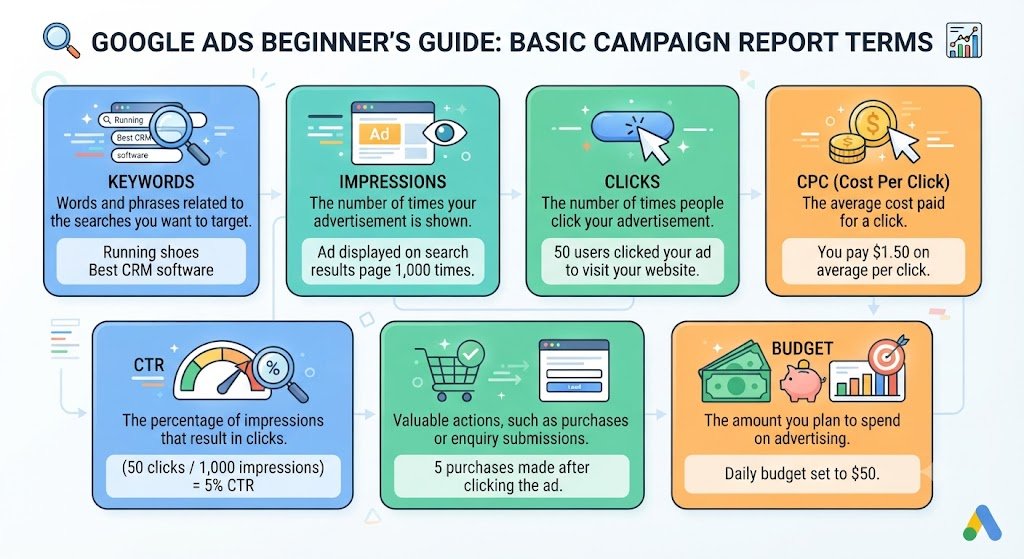
Every Google Ads Beginner’s Guide should explain the basic terms used in campaign reports.
- Keywords: Words and phrases related to the searches you want to target.
- Impressions: The number of times your advertisement is shown.
- Clicks: The number of times people click your advertisement.
- CPC: The average cost paid for a click.
- CTR: The percentage of impressions that result in clicks.
- Conversions: Valuable actions, such as purchases or enquiry submissions.
- Budget: The amount you plan to spend on advertising.
Understanding these terms will make it easier to follow this Google Ads Beginner’s Guide and evaluate campaign results.
3. Research Keywords Before Launching
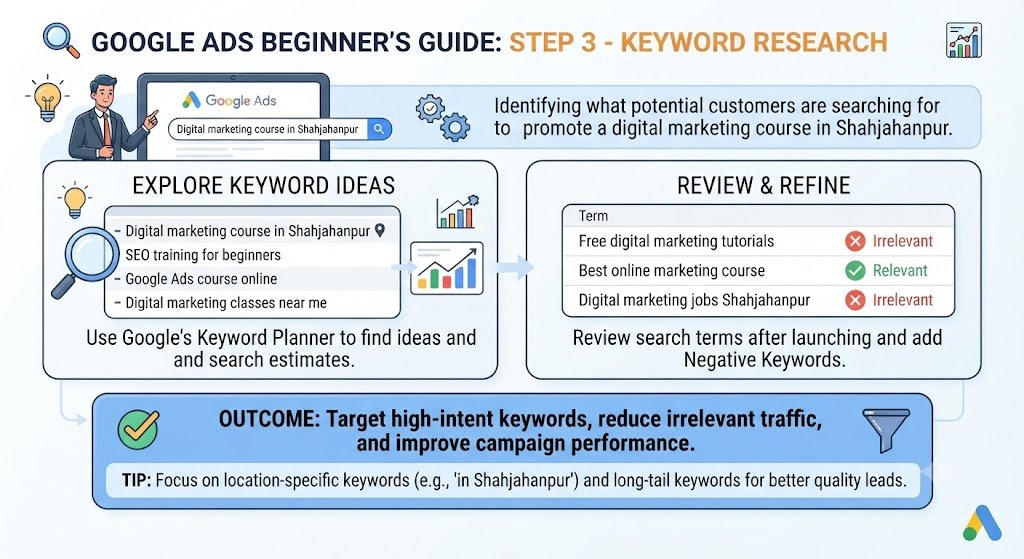
Keyword research helps you identify what potential customers are searching for. In this Google Ads Beginner’s Guide, consider a training institute promoting a digital marketing course in Shahjahanpur.
Possible keyword ideas include:
- Digital marketing course in Shahjahanpur
- SEO training for beginners
- Google Ads course online
- Digital marketing classes near me
Use Google’s Keyword Planner to explore ideas and available search estimates. Review search terms after launching a campaign and consider negative keywords to reduce irrelevant traffic.
A useful Google Ads Beginner’s Guide should remind you that keywords need to match your actual offer and the searcher’s intent.
4. Set Your Campaign Goal and Budget
Before launching an advertisement, decide what you want to achieve. Your goal might be to generate enquiries, sell products, encourage phone calls, or increase registrations.
For example, a small institute might plan to test an average daily budget of ₹300. That does not guarantee a particular number of leads or sales. Actual performance depends on competition, targeting, the offer, and the landing page.
This Google Ads Beginner’s Guide recommends starting with a budget you can afford to test and monitoring spending carefully.
5. Write Relevant and Helpful Ads
Your advertisement should explain what you offer, why it matters, and what users should do next.
For example, a digital marketing institute could use headlines such as:
- Learn Digital Marketing Skills
- Beginner-Friendly Training
- Explore Course Details
The description should clearly explain the actual course benefits without making unsupported promises.
When following this Google Ads Beginner’s Guide, remember that relevant ad copy can help set the right expectations, but it cannot guarantee clicks or conversions.
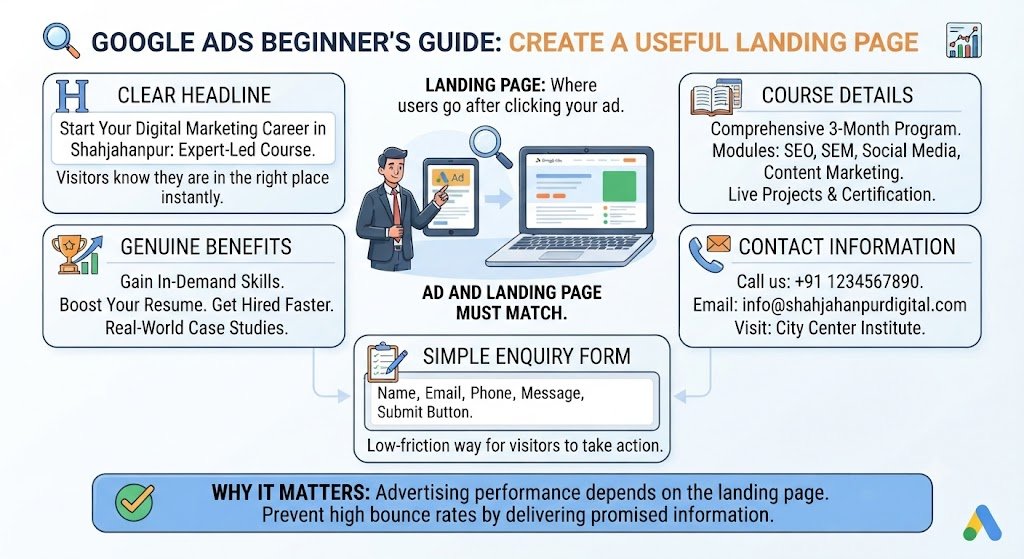
6. Create a Useful Landing Page
A landing page is the page users visit after clicking an advertisement. It should match the advertisement and provide the information visitors expect.
Include a clear headline, course details, genuine benefits, contact information, and a simple enquiry form where appropriate.
This Google Ads Beginner’s Guide highlights landing pages because advertising performance depends on more than the ad itself. If visitors cannot find the promised information, they may leave without taking action.
7. Track and Improve Campaign Performance
Once your campaign is running, monitor CTR, CPC, conversions, cost per conversion, and search terms. Configure conversion tracking correctly before using conversion data to judge results.
One common beginner struggle is receiving clicks without getting enquiries. Instead of immediately increasing the budget, investigate whether your keywords are relevant, the landing page works correctly, and the tracking setup is accurate.
The practical lesson from this Google Ads Beginner’s Guide is to make decisions based on evidence rather than assumptions.
Learn Paid Search with DIZITAL MANTRAS
At DIZITAL MANTRAS, learners can develop their digital marketing knowledge through practical exercises and project planning.
Use this Google Ads Beginner’s Guide to create a sample campaign project containing keyword research, ad copy, a proposed budget, a landing page checklist, and a conversion tracking plan.
You can use a fictional business for practice and clearly label sample campaigns as mock projects. This helps you demonstrate your understanding without claiming results from advertisements you have not actually run.
Conclusion
This Google Ads Beginner’s Guide explains the foundations of paid search, from keyword research and campaign budgeting to ad copy, landing pages, and performance tracking.
Learning Google Ads takes practice. You may make mistakes, receive fewer enquiries than expected, or need to revise your campaign plan. Instead of giving up, identify the problem and make careful improvements.
Use this Google Ads Beginner’s Guide as a starting point, practise with a sample campaign, and gradually develop your paid search skills.